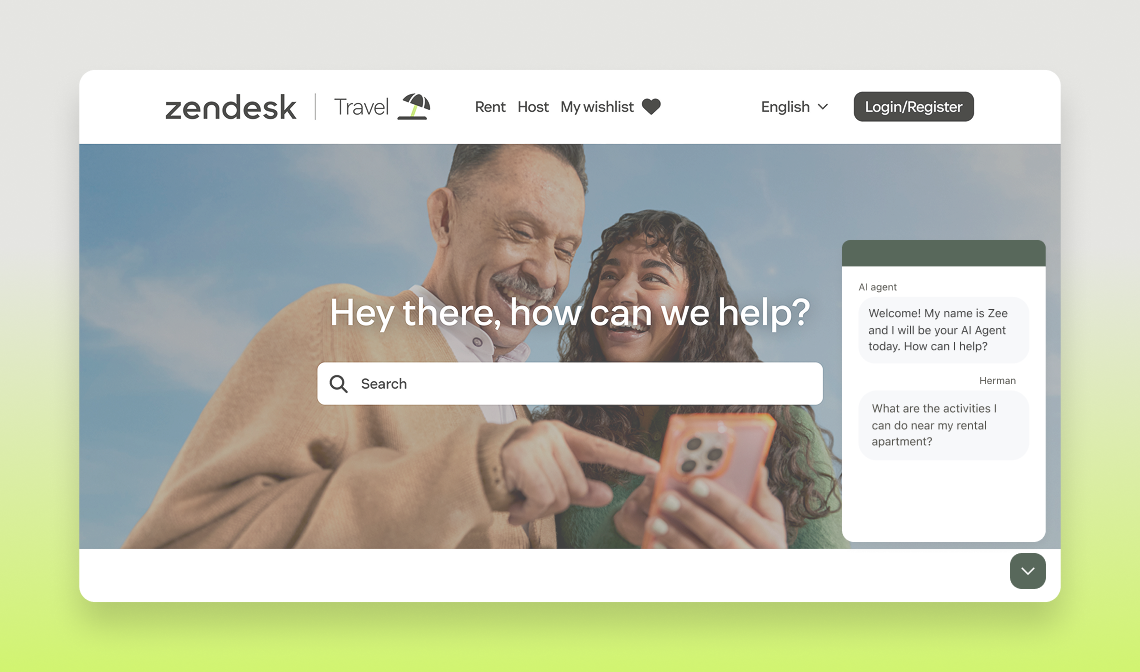

Travel Demo - ZenTravel

This AI-powered agent enables you to simulate a seamless end-user experience tailored for travel and hospitality scenarios. 

Whether you are trying to book your next trip to Las Vegas or finding your booking confirmation, this demo asset got you covered. All rich features of the Advanced plan are being used to the fullest for you to deliver an impactful demo.

Open widget

Other channels:

Travel-videothumbnail
play Watch

Overview

  • When should I demo Essential vs. Advanced features?

    The Essential plan allows users to build an AI Agent able to provide generative responses based on the content available in their knowledge sources. It is relevant for users in need of automating entry-level queries. It is important to mention that the generative responses our AI Agent will create can only be of high quality if the knowledge sources provided is of high quality as well. It is then key for the user to have a clean and well-organised knowledge source.

    The Advanced plan goes beyond generative responses and allows users to automate the most sophisticated queries thanks to conversation flows and APIs. Our hybrid model allows users to combine the power of generative responses with conversation flows which ensures the most relevant and impactful responses for end users.

  • What’s included in AI Agents Essential?

    Any customer can start automating in minutes with powerful generative replies.


    Start automating in minutes with the most powerful generative AI agent capabilities–perfect for automating repetitive FAQs with minimal setup.

    What’s included: 

    • Smarter generative replies
    • Upgraded AI personas + tone of voice
    • 30 languages supported (expanded support on roadmap)
    • Key metrics e.g. active users, transferred to agent, automated resolution
    • Escalations, data capture, and fallback handling
    • Roadmap highlights: - Instructions for generative replies- Generative replies for email- Multiple content sources
  • What’s included in AI Agents Advanced?

    Position Advanced AI agents for more customization and sophisticated use cases.

    Unlock advanced capabilities, greater customization, and robust analytics–perfect for customers with more sophisticated use cases.

    Includes all Essential features plus:

    • AI agent builder
    • Conversation flows and hybrid flows
    • Omnichannel functionality
    • Comprehensive API access and orchestration
    • AI agent-spanning analytics and robust reporting
    • Multiple data sources (beyond ZD knowledge base)
    • Roadmap: Access to all future innovations
  • Do you have a recommended storyline?

    If you want to make sure to create a “wow effect” for your prospects, you can follow the storyline suggested below. 

    Check the details below to know how to trigger each use case!

    • Generative Replies
    • Cancel Booking / Manage travel reservation
    • Activity Recommendation
    • Talk to an Agent

    Once you feel comfortable  with this flow feel free to come up with your own stories weaving on the predefined use cases.

  • How can I customize my demo?

    If you scroll to the bottom of the page where the widget is, you can upload a custom image that will instantly show up. Our recommendation is to screenshot the helpcenter or support page of the prospect or customer that you are pitching to and upload it directly. You can’t go wrong with light customization!

Essential plan use cases

Generative Answers

By simply connecting to a Zendesk helpcenter in a few clicks, our customers are able to harness the content of their articles in a seamless and conversational way thanks to our Essential AI Agents.

They will answer exclusively based on the articles and little setup is needed. 


Key features showcased

  • Conversational experience
  • Link to Zendesk helpcenter articles

Prompts to trigger the Use cases

  • Where can I find my booking confirmation?
  • How to change or cancel my reservation?
  • Can I contact the booking site?
  • I’m a property owner and need support

Advanced plan use cases

Find Rental location

Showcase the AI Agent retrieving booking information based on booking numbers and then providing directions to the rental.


Key features showcased

  • API integration to provide rental details
  • Carousel to show the booking details
  • Conditional flows / Entity recognition to personalize based on booking number recognition
  • Webview for sharing location / embed map


Booking numbers to use:

  • 54321 = Rental in Amsterdam
  • 12345 = Rental in Berlin
  • 12321 = Rental in Spain


Prompts to trigger the Use case

  • Where's my rental located
  • Whats the address of my rental
  • Can you help me find my way to the villa
  • Can I have directions to my booking location
  • Where is the place

Manage travel reservation

Illustrate the AI Agent retrieving booking information based on booking numbers, and then providing the possibility to change the booking dates and number of guests.


AI Agent features showcased

  • API integration to provide rental details
  • Carousel to show the booking details
  • Conditional flows / Entity recognition to give specific answers
  • Sunshine Conversations features showcased
  • Webview for calendly

Booking numbers to use

  • 54321 = Rental in Amsterdam — cannot cancel but can change dates and number of guests
  • 12345 = Rental in Berlin — dates cannot be changed but number of guests can be
  • 12321 = Rental in Spain — both dates and number of guests can be changed


Prompts to trigger the Use case

  • Can I change the details
  • Change date
  • Update details
  • I would like to update the details
  • I want to change the date

Activity recommendations

Showcase the AI agent retrieving booking information based on booking numbers, and then providing a carousel of activities that can be booked in each location.


Key features showcased

  • API integration to provide rental details
  • Carousel to show activity recommendations
  • Conditional flows / Entity recognition to give specific answers
  • Sunshine Conversations features showcased
  • Template to collect data
  • Conversation extension to view and manage the booking
  • Stripe pop-up to add card details


Booking numbers to use

  • 54321 = Rental in Amsterdam
  • 12345 = Rental in Berlin
  • 12321 = Rental in Spain


Card details to use:

  • Card number — 4242 4242 4242 4242
  • Date — anytime in the future
  • CVC — 123

Cancel reservation

Showcase the possibility of either being able to change or cancel a reservation directly within the chat widget.


Key features showcased

  • API integration to provide rental details
  • Carousel to show booking details
  • Conditional flows / Entity recognition to give specific answers

Booking numbers to use

  • 12321 = one rental, no cancellation but a change is possible — continues to manage the booking
  • 12345 = one rental, which can be canceled


Prompts to trigger the Use case

  • I’d like to cancel the booking
  • Can I cancel my reservation
  • Can I still cancel my trip
  • Could you help me cancel my booking
  • I have a trip coming up I’d like to cancel

Pro Tip: change the background for your demo!

If you scroll to the bottom of the page where the widget is, you can upload a custom image that will instantly show up. Our recommendation is to screenshot the helpcenter or support page of the prospect or customer that you are pitching to and upload it directly. You can’t go wrong with light customization!

Additional Resources

Need a specialist?

Visit the Center of Excellence for specialized support on deals & accounts

Got feedback?

Submit your feedback in this form to let us know how we’re doing.

Bieten Sie mit Ultimate besseren, schnelleren und effizienteren Kundensupport

G2-Badges-Winter23 G2-Spitzenreiter