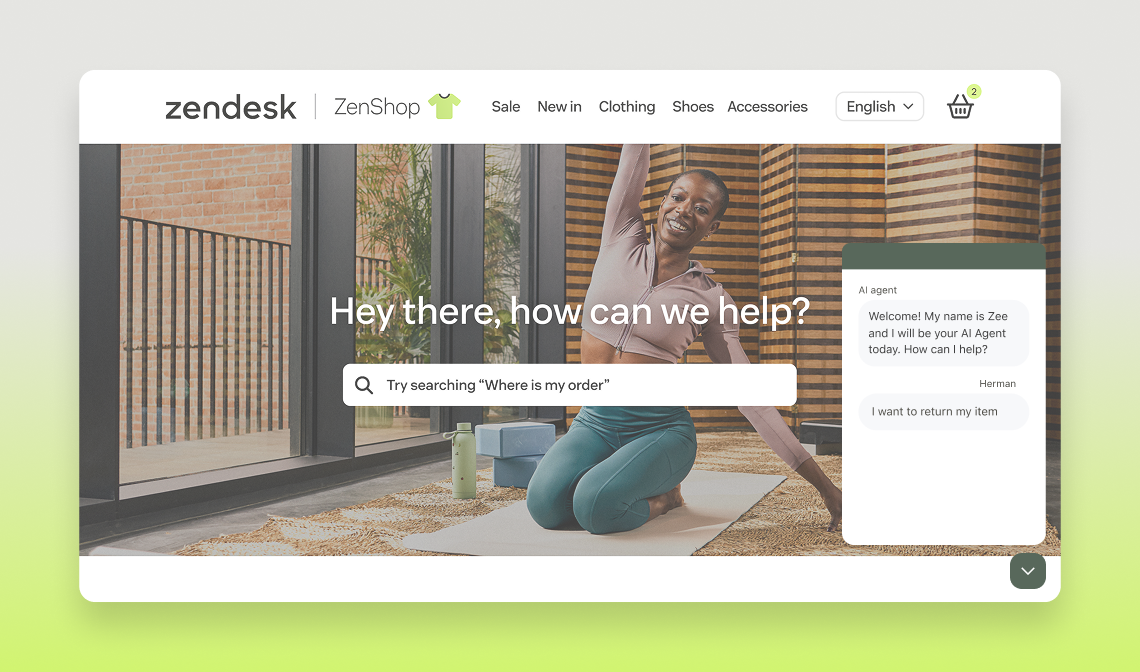

Retail Demo - ZenShop

This AI-powered agent enables you to simulate a seamless end-user experience tailored for retail / e-commerce scenarios. Whether you're driving pre-purchase experiences, order assistance or return processes this guide provides everything you need to showcase the value and key features of AI Agents (Advanced) effectively and impactfully.

Open widget

Other channels:

Retail-videothumbnail
play Watch

Overview

  • When should I demo Essential vs. Advanced features?

    The Essential plan allows users to build an AI Agent able to provide generative responses based on the content available in their knowledge sources. It is relevant for users in need of automating entry-level queries. It is important to mention that the generative responses our AI Agent will create can only be of high quality if the knowledge sources provided is of high quality as well. It is then key for the user to have a clean and well-organised knowledge source.

    The Advanced plan goes beyond generative responses and allows users to automate the most sophisticated queries thanks to conversation flows and APIs. Our hybrid model allows users to combine the power of generative responses with conversation flows which ensures the most relevant and impactful responses for end users.

  • What’s included in AI Agents Essential?

    Any customer can start automating in minutes with powerful generative replies.


    Start automating in minutes with the most powerful generative AI agent capabilities–perfect for automating repetitive FAQs with minimal setup.

    What’s included: 

    • Smarter generative replies
    • Upgraded AI personas + tone of voice
    • 30 languages supported (expanded support on roadmap)
    • Key metrics e.g. active users, transferred to agent, automated resolution
    • Escalations, data capture, and fallback handling
    • Roadmap highlights: - Instructions for generative replies- Generative replies for email- Multiple content sources
  • What’s included in AI Agents Advanced?

    Position Advanced AI agents for more customization and sophisticated use cases.

    Unlock advanced capabilities, greater customization, and robust analytics–perfect for customers with more sophisticated use cases.

    Includes all Essential features plus:

    • AI agent builder
    • Conversation flows and hybrid flows
    • Omnichannel functionality
    • Comprehensive API access and orchestration
    • AI agent-spanning analytics and robust reporting
    • Multiple data sources (beyond ZD knowledge base)
    • Roadmap: Access to all future innovations
  • Do you have a recommended storyline?

    If you want to make sure to create a “wow effect” for your prospects, you can follow the storyline suggested below. 

    Check the details below to know how to trigger each use case!
    • Generative Replies
    • Order Status
    • Return Policy
    • Store location

    Once you feel comfortable  with this flow feel free to come up with your own stories weaving on the predefined use cases.

  • How can I customize my demo?

    If you scroll to the bottom of the page where the widget is, you can upload a custom image that will instantly show up. Our recommendation is to screenshot the helpcenter or support page of the prospect or customer that you are pitching to and upload it directly. You can’t go wrong with light customization!

Getting started

When navigating through the experience, you get to choose whether you are showing the Essential or Advanced features by toggling it on your left-hand side.

When to use Essential or Advanced?

The Essential plan allows users to build an AI Agent able to provide generative responses based on the content available in their knowledge sources. It is relevant for users in need of automating entry-level queries. It is important to mention that the generative responses our AI Agent will create can only be of high quality if the knowledge sources provided is of high quality as well. It is then key for the user to have a clean and well-organised knowledge source.

The Advanced plan goes beyond generative responses and allows users to automate the most sophisticated queries thanks to conversation flows and APIs. Our hybrid model allows users to combine the power of generative responses with conversation flows which ensures the most relevant and impactful responses for end users.

Customer satisfaction

All flows end in a customer satisfaction request which can determine whether a user would receive the option to be escalated to a human agent (in real life) to further assist them.

Within this flow, we remove any parameters you defined during the session, like order numbers and email addresses, so the demo starts fresh each time you access the widget.

Not sure how to get started?

You can ask the bot what it knows and it will provide the key topics as buttons to help you start the demo (in the advanced mode). In addition to this, we have dedicated pages on each industry to walk through the experiences, value and key details.

Essential - Generative Answers

Value of Generative AI

+ Little to no setup
+ Covers as many use cases as your Knowledge Base does
- No control over the answers

Prompts to trigger Generative AI

  • How to buy a gift card?
  • My return label is missing
  • Do you have the exchange policy
  • How to get a copy of my invoice?
  • I received an item I didn't order

About the Knowledge Source

We’ve gathered and anonymized a few public helpcenters resources that we aggregated to provide a solid knowledge base that is generic and corresponds to our customers' most searched questions.

This will provide our generative AI technology the flexibility and responsiveness to address various questions while consistently referring to our recommended questions and storylines for demonstrations.

Open widget


Recommended Storylines

If you want to make sure to create a “wow effect” for your prospects, you can follow the two storylines suggested below. 

Check the details below to know how to trigger each use case!

  • Generative Replies
  • Order Status
  • Return Policy
  • Store locations

Essential plan use cases

Generative Answers

By simply connecting to a Zendesk helpcenter in a few clicks, our customers are able to harness the content of their articles in a seamless and conversational way thanks to our Essential AI Agents.
They will answer exclusively based on the articles and little setup is needed. 


Key features showcased:

  • Conversational experience
  • Link to Zendesk helpcenter articles

Prompts to trigger the Use cases

  • How can I get an invoice?
  • How much does shipping cost?
  • What countries do you ship to?
  • Are customs fees included in the shipping?

Advanced plan use cases

Refund Status

Customers want to know when they’ll receive their money back after a return or order cancellation. This flow provides real-time updates on the refund process, expected timelines, and any actions needed from the customer, reducing uncertainty and improving trust.


Key features showcased

  • API integration to provide order return details
  • Carousel to show items included in the return
  • Conditional flows / Entity recognition to personalize based on order number recognition

Prompts to trigger the Use case

  • Where can I get a refund?
  • When will I get my refund?
  • Give me my money back!
  • Can you give me an update on my refund?

Return Policy & Process

Customers value transparency when returning items. This flow clarifies return eligibility, timeframes, and step-by-step instructions, making the process hassle-free while setting clear expectations on refunds, exchanges, and any associated costs.


Key features showcased

  • API integration to provide order details
  • Carousel to show items included in the order
  • Conditional flows / Entity recognition to personalize based on order number recognition

Order numbers to use:

  • Any 5-digit number ending in 1 will show a return is possible and provide a walk-through
  • Any 5-digit number ending in 2 will say it is not possible to return


Prompts to trigger the Use case

  • Can I return my order?
  • How do I return something?
  • I have an item I want to return?
  • What the return process?
  • Can you tell me about the return policy?

Change Delivery Date

Unexpected schedule changes can make it difficult for customers to receive their order as planned. This flow allows them to modify their delivery date easily, ensuring convenience and flexibility while minimizing missed deliveries and rescheduling hassles.


Key features showcased

  • API Integration to provide order details
  • Carousel to show items in order
  • Conditional flows / Entity recognition to personalize based on order number recognition
  • Date picker webview

Order numbers to use:

  • 12321 = Order number to show it’s possible to change date
  • 12345 = Order number to show it’s possible to change date
  • 54321 = Order number to show that the order has been shipped and cannot be changed


Prompts to trigger the Use case

  • Change delivery time
  • Can you deliver earlier
  • Can we change my delivery date
  • Update delivery time
  • Can we postpone the delivery

Sizing Inquiries

Choosing the right size is crucial to avoid returns and ensure a great shopping experience. This flow helps customers by providing accurate size charts, fit recommendations, and comparisons to standard sizing, for shoes and clothing helping them make confident purchasing decisions.


Key features showcased

  • Carousel to show brands
  • Conditional flows / Entity recognition to personalize based on user preferences

Prompts to trigger the Use case

  • I’m not sure what size shoes I should buy, can you give me some suggestions
  • How do clothes sizing work
  • What sizes are available
  • Help with sizing
  • What do these sizes mean
  • Where can I find out about the sizes

Product Stock Availability

Shoppers want to know if an item is available before making a purchase. This flow provides real-time stock updates, estimated restock timeline, and allows purchasing within the chat ensuring a smoother shopping experience.


Key features showcased

  • API integration to check product availability
  • Carousel to show the item in different sizes and to offer buttons to purchase within the chat
  • Conditional flows / Entity recognition to personalize based on order number recognition
  • Template/Form to collect customer information to update details

Order numbers to use:

  • 54321 = pink sweater
  • 12345 = yellow sun dress
  • 12321 = white t-shirt


Prompts to trigger the Use case

  • Can I check the availability of an item
  • Is this yellow sun dress in stock 12345
  • Can you check stock of a t-shirt
  • Do you have this pink sweater in stock
  • I got this shirt and I want to order a new size
  • Do you have this top in large

Order Status & Tracking

Customers appreciate knowing where their order is at every stage. This flow offers instant tracking updates and the estimated delivery date giving them peace of mind and reducing customer service inquiries. To throw in a real use case, one of the orders has actually been cancelled, but we offer a reorder within the chat directly.


Key features showcased

  • API integration to provide order status details
  • Carousel to show a canceled item to reorder or the items included in the order and to either return or report an issue
  • Conditional flows / Entity recognition to personalize based on order number recognition
  • Template/Form to collect customer information to update details

Order numbers to use:

  • 54321 = canceled order, reorder through chat with the same or a new address
  • 12345 = order delivered
  • 12321 = order shipped


Prompts to trigger the Use case

  • Where is my order
  • What’s the status of my order
  • Can you chase an order for me?
  • Track my order
  • Where is my parcel
  • Item not delivered
  • I have a query about my recent order
  • Can you see where my order is

Store Locations & Hours

Some customers prefer in-store shopping or need to visit a store for returns and services. This flow provides up-to-date information on store locations, hours of operation, and in-store services, making it easier for customers to plan their visit. Stores are available in Berlin, Helsinki & London.


Key features showcased

  • Conditional flows based on locale details or if someone states a defined city
  • Shorthand to trigger asking location permission to share
  • Send the embedded map

Prompts to trigger the Use case

  • Where are your stores
  • Where are you located
  • What stores do you have
  • Where's my closest store
  • Store location

Additional Resources

Need a specialist?

Visit the Center of Excellence for specialized support on deals & accounts

Got feedback?

Submit your feedback in this form to let us know how we’re doing.

Bieten Sie mit Ultimate besseren, schnelleren und effizienteren Kundensupport

G2-Badges-Winter23 G2-Spitzenreiter