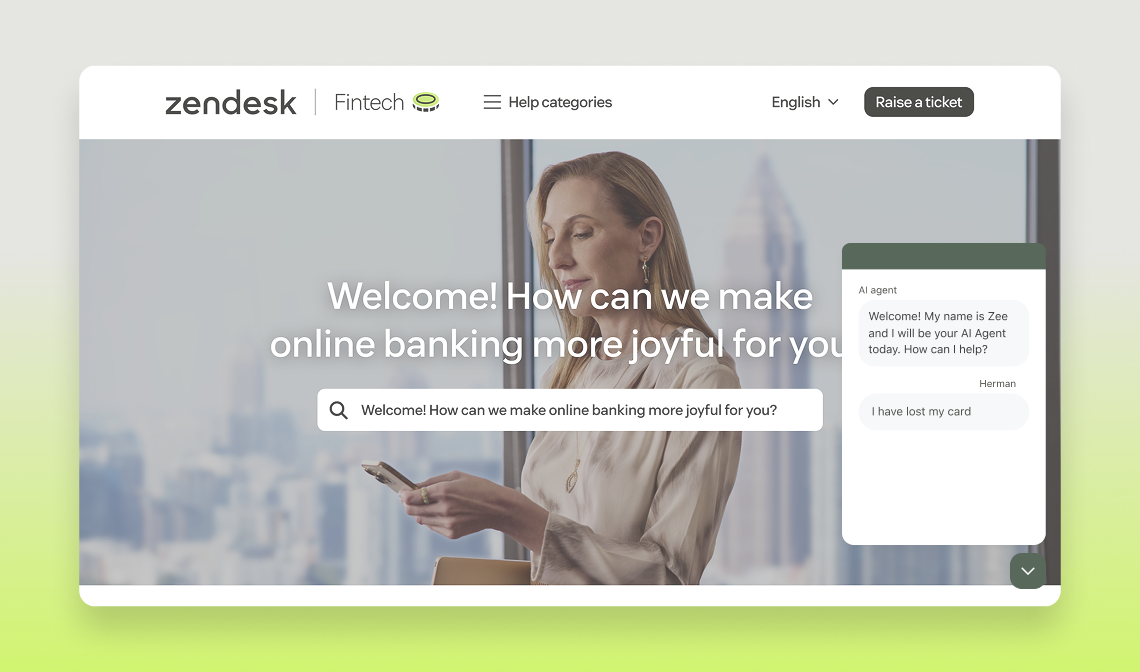

Fintech Demo - ZenFunds

This AI-powered agent enables you to simulate a seamless end-user experience tailored for Financial Services & FinTech common use cases.

Whether you’re trying to transfer funds from your crypto wallet or order a new banking card, this demo has got your back!

Open widget

Other channels:

Fintech-videothumbnail
play Watch

Overview

  • When should I demo Essential vs. Advanced features?

    The Essential plan allows users to build an AI Agent able to provide generative responses based on the content available in their knowledge sources. It is relevant for users in need of automating entry-level queries. It is important to mention that the generative responses our AI Agent will create can only be of high quality if the knowledge sources provided is of high quality as well. It is then key for the user to have a clean and well-organised knowledge source.

    The Advanced plan goes beyond generative responses and allows users to automate the most sophisticated queries thanks to conversation flows and APIs. Our hybrid model allows users to combine the power of generative responses with conversation flows which ensures the most relevant and impactful responses for end users.


  • What’s included in AI Agents Essential?

    Any customer can start automating in minutes with powerful generative replies.


    Start automating in minutes with the most powerful generative AI agent capabilities–perfect for automating repetitive FAQs with minimal setup.

    What’s included: 

    • Smarter generative replies
    • Upgraded AI personas + tone of voice
    • 30 languages supported (expanded support on roadmap)
    • Key metrics e.g. active users, transferred to agent, automated resolution
    • Escalations, data capture, and fallback handling
    • Roadmap highlights: - Instructions for generative replies- Generative replies for email- Multiple content sources
  • What’s included in AI Agents Advanced?

    Position Advanced AI agents for more customization and sophisticated use cases.

    Unlock advanced capabilities, greater customization, and robust analytics–perfect for customers with more sophisticated use cases.

    Includes all Essential features plus:

    • AI agent builder
    • Conversation flows and hybrid flows
    • Omnichannel functionality
    • Comprehensive API access and orchestration
    • AI agent-spanning analytics and robust reporting
    • Multiple data sources (beyond ZD knowledge base)
    • Roadmap: Access to all future innovations
  • Do you have a recommended storyline?

    If you want to make sure to create a “wow effect” for your prospects, you can follow the storyline suggested below. 

    Check the details below to know how to trigger each use case!

    • Generative Replies
    • Login issues
    • Lost or stolen card
    • Order new card

    Once you feel comfortable  with this flow feel free to come up with your own stories weaving on the predefined use cases.

  • How can I customize my demo?

    If you scroll to the bottom of the page where the widget is, you can upload a custom image that will instantly show up. Our recommendation is to screenshot the helpcenter or support page of the prospect or customer that you are pitching to and upload it directly. You can’t go wrong with light customization!

Essential plan use cases

Generative Answers

By simply connecting to a Zendesk helpcenter in a few clicks, our customers are able to harness the content of their articles in a seamless and conversational way thanks to our Essential AI Agents.

They will answer exclusively based on the articles and little setup is needed. 


Key features showcased

  • Conversational experience
  • Link to Zendesk helpcenter articles

Prompts to trigger the Use cases

  • What is the status of my wire?
  • Has my wire been completed yet?
  • Can you tell me if my wire went through?

Advanced plan use cases

Credit limit enquiry

Showcase the AI agent providing customers with details of their current spending limit, and updating these limits for a credit card.


Key features showcased

Use of backend integrations to:

  • Verify a customer's identity, account information, and credit card details
  • Obtain credit limit for a specified card
    Enable update of credit limit data

Prompts to trigger the Use case

  • Are there any credit limits on my card
  • Can the credit limit be increased
  • Can I increase my credit limit
  • I would like to increase my limit
  • Can I increase the limit on my credit card
  • Can you see what my current credit limit is
  • Check my credit limit
  • Could you check the limit on my card

Change contact details

Illustrate how the AI agent can help a customer to update their personal information, including first name, last name, phone number, and email address — and can forward the conversation to an agent if self-service guidance is insufficient.


AI Agent features showcased

  • Conditional flows based on whether a user is logged in or not — login buttons at the bottom of the page
  • Data collection prior to escalation, and passing that information to a live agent (not supported in demo environment)
  • Sunshine Conversations features showcased
  • Form / Template used to collect customer data
  • Transfer status
  • Advise on standard transfer durations
  • To check the status of a specific transfer, verify the user with the use of an ID to check on the transaction.

Prompts to trigger the  Use case

  • Can I update my contact details via chat
  • Can you change my contact details, please
  • Can you update my details, please
  • Can you update my details super fast
  • Change my address
  • Could you update my phone number, please


ID numbers to use

  • Any 5-digit number ending in 1 will ask for an email address or transfer number, then request a verification code
  • Any 5-digit number ending in 3 or 5 will show a successful account verification and transfer

What's the status of the wire transfer?

Customers value efficiency and speed when it comes to completing such simple tasks. This flow showcases how this can be fully automated with AI.


Key features showcased

Use of backend integration to:

  • Verify customer identity, account details, and credit card details
  • Obtain the status of a transaction
  • Perform verification within the chat

Prompts to trigger the Use case

  • What is the status of my wire?
  • Has my wire been completed yet?
  • Can you tell me if my wire went through?

Login issues

Based on whether a user is already logged in, the support flow is triggered to reset the user ID or password. Use the anonymous user button at the bottom of the page to demonstrate this.


Key features showcased

  • Backend integration to verify customer identity and logged-in status
  • Collection and remembering of data inputs
  • Entity recognition and conditional flows

Account ID numbers to use

  • Any 5-digit number ending in 1 will ask for email verification then trigger the support flow
  • Any 5-digit number ending in 3 will proceed directly to the support flow


Prompts to trigger the Use case

  • I’m having login issues
  • Can you help reset my password
  • Can’t login - could you help me get into my account
  • How can I change my password
  • Where can I get a password reset

How to transfer funds

Demonstrate using buttons to enhance the chat experience and guide customers through the process of making a transfer.


Key features showcased

  • Embed videos

Prompts to trigger the Use case

  • How do I do a transfer
  • Can you walk me through how to transfer money
  • What's the process to transfer money
  • Could you help me do my first transfer

Lost or stolen card

Based on whether someone is logged in or not, simulate asking a user to verify their account information, then provide options to deactivate or block individual or all cards.


Key features showcased

  • Carousels to display card details
  • Buttons for double verification
  • Data collection form (not connected so any numbers will work)

Prompts to trigger the Use case

  • I need to block a card
  • I want to deactivate my card
  • How do I block a card
  • Could you help me cancel my cards

Order a new card

Guide users to order new debit and credit cards, determining the credit limit they would like to set and what color their new card should be.


Key features showcased

  • Carousels to display card details
  • Data collection for non-logged-in users

Prompts to trigger the Use case

  • Can I order a new card
  • My card is worn out - can I replace it
  • My card is broken
  • Theres an issue with my contactless - I would like a new card please

Pro Tip: change the background for your demo!

If you scroll to the bottom of the page where the widget is, you can upload a custom image that will instantly show up. Our recommendation is to screenshot the helpcenter or support page of the prospect or customer that you are pitching to and upload it directly. You can’t go wrong with light customization!

Additional Resources

Need a specialist?

Visit the Center of Excellence for specialized support on deals & accounts

Got feedback?

Submit your feedback in this form to let us know how we’re doing.

Bieten Sie mit Ultimate besseren, schnelleren und effizienteren Kundensupport

G2-Badges-Winter23 G2-Spitzenreiter